After Effects Alternatives (2026): Free, Pay Once, and the AI Clones
November 3, 2026 · Eben - AskEditor · 13 min read
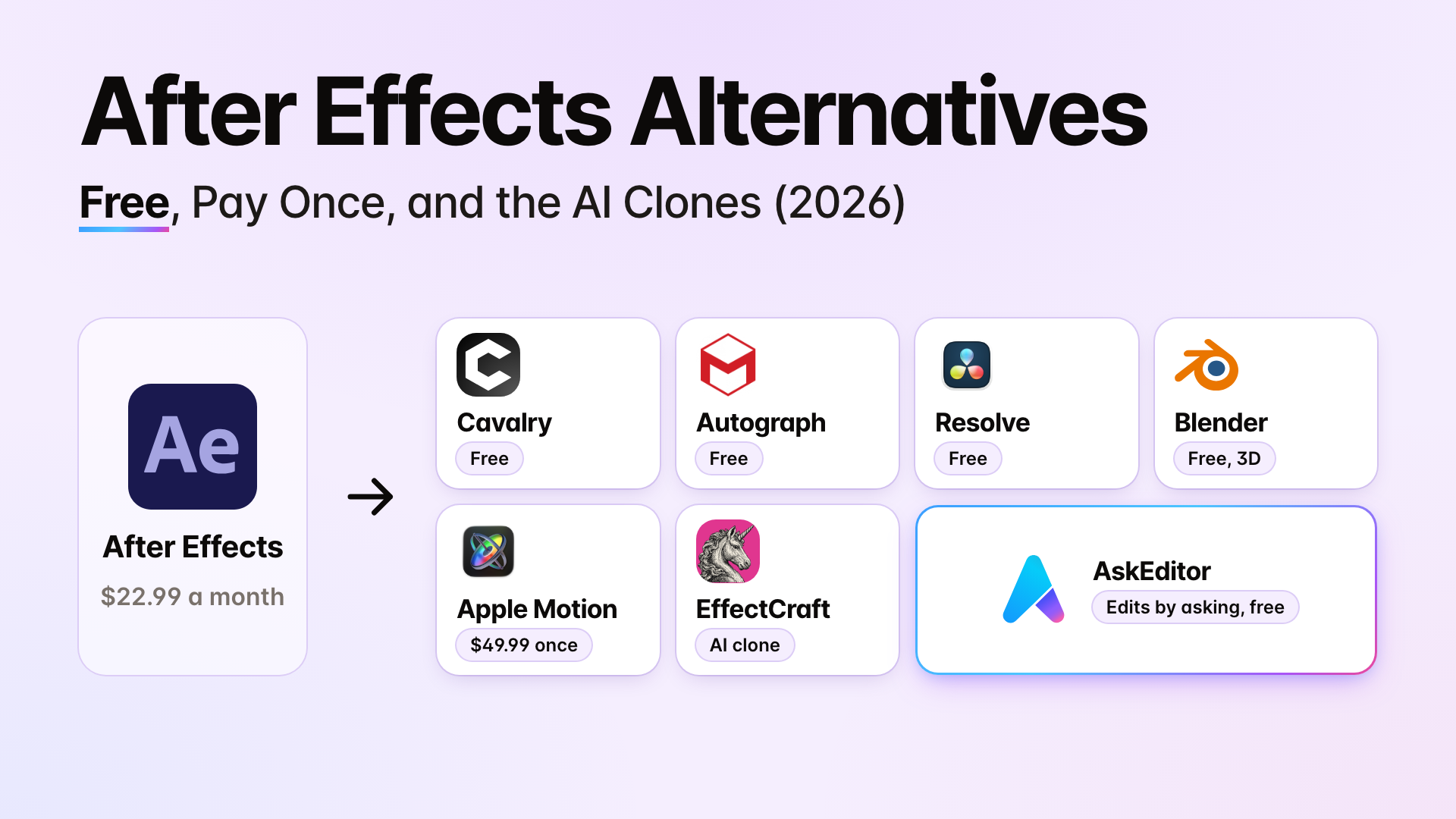
The best After Effects alternative for motion graphics, fan edits or compositing, on Windows or Mac, with each one's catch, price and laptop it needs.
Table of contents
The best After Effects alternative depends on what you make and what computer you make it on. Each pick below comes with its catch, from the company's own pages on 30 October 2026, checked again on 2 November 2026.
- Titles, text and 2D motion graphics: Cavalry, free on Windows and Mac. You sign in with a Canva account, since Canva owns it. Maxon's Autograph is free too, on Windows or an Apple silicon Mac, but wants 16 GB of memory.
- Fan edits (velocity, shakes, 3D camera, glow): DaVinci Resolve, free on Windows and Mac, does all of them. It wants 16 GB on Windows, 32 GB if you use its Fusion page.
- Compositing and VFX: Resolve's Fusion page, free and node based. Blender for 3D, free and light enough for an 8 GB laptop.
- Pay once: Apple Motion, $49.99, Mac only. Resolve Studio, $295 ($236 until 20 November 2026).
- EffectCraft, the clone built with AI: free, open source, on Windows. Its own page says it's alpha and not for client work.
- Rather ask an AI than learn an editor: As of November 2026, Autograph, Cavalry and Resolve Studio let an AI assistant drive them. So does AskEditor, which we make; its price and catch are in that section.
After Effects itself costs $22.99 a month on a yearly plan, and leaving early costs half of what's left of the year. We read the 2,342 top comments under the 12 biggest YouTube videos on this search to find out what you'd ask.
Start here: which pick is yours
- I make titles and explainers for clients Cavalry, Autograph or Motion, and what you lose leaving After Effects.
- I make fan edits Velocity, shakes, 3D camera and glow, free on Windows.
- My laptop is ordinary What runs on 8 GB or 16 GB, by each maker's own minimums.
- I make faceless videos Titles and charts over your own voice by asking an AI, on any laptop.
Best After Effects alternative for titles
Cavalry is the free one for 2D text and shapes on Windows or Mac; Autograph is the free one if your computer is strong; Apple Motion is the one you pay for once, on a Mac.
| Tool | Best for, and the catch | Runs on |
|---|---|---|
| Cavalry | 2D text, shapes, data. Free since 16 April 2026, with a Canva sign-in | Windows, Mac; NVIDIA cards are fine, built-in Intel graphics must be 12th generation or newer |
| Autograph (Maxon) | Motion design and compositing. Free for individuals and teams, "no output limitations"; a MyMaxon account and an online licence check | Windows, Apple silicon Mac; 16 GB and a 4 GB graphics card |
| Apple Motion | Titles and templates for Final Cut users. $49.99 once | Mac only |
| DaVinci Resolve (Fusion) | Text and graphics in a node editor, free; nodes take learning | Windows, Mac; 16 GB, 32 GB with Fusion |
| Blender | 3D, and 2D with Grease Pencil, free | Windows, Mac; an 8 GB laptop |
Canva's catch, in practice: Canva says what's free in Cavalry "will remain free", but its terms let it limit or remove access at any time without notice. You own what you make.
Cavalry and Autograph both have JavaScript expressions, with their own functions rather than After Effects' own. Sources: Cavalry's requirements and Canva's free Cavalry page, Autograph and Maxon's requirements, Apple Motion, Resolve, Blender's requirements.
What you lose leaving After Effects. If clients send you projects, this is the part that decides it:
- Nothing opens an After Effects project file (.aep). Not one of the tools here.
- Motion Graphics templates (.mogrt) are made in After Effects or Premiere, and Adobe names no other app that makes them. An editor who wants one needs After Effects.
- Plugins: most Red Giant effects run in Autograph and Resolve, but Trapcode Particular and Form run only in After Effects (Maxon's list).
- Expressions have to be rewritten for Cavalry's or Autograph's JavaScript. EffectCraft is the only one that copies After Effects' own.
- When to leave: close to your yearly renewal, because leaving earlier costs half of what's left of the year (the terms).
That's why 134 of the commenters say nothing replaces After Effects yet, mostly for plugins, client files and roto.
Fan edits without After Effects
DaVinci Resolve does all four on Windows for free: speed ramps, camera shake, a 3D camera in Fusion, and glow. Motion blur is in the paid Studio. It also does optical flow, the smooth slow motion people buy Twixtor for.
| Effect | Free in Resolve? | Elsewhere |
|---|---|---|
| Velocity (speed ramps) | Yes, with optical flow | Blender (frame blending); EffectCraft |
| Camera shake | Yes | Blender; EffectCraft |
| 3D camera | Yes, in Fusion | Blender; EffectCraft |
| Glow | Yes | Blender (Glare); EffectCraft |
| Motion blur, Speed Warp | Studio only, $295 ($236 until 20 November 2026) | EffectCraft |
| Velocity in CapCut | Not Resolve | CapCut's desktop app has velocity and optical flow (its own guide); which parts are Pro, its pages don't agree |
Glow and camera shake aren't on Blackmagic's list of Studio-only features. The catch is the computer: 16 GB of memory on Windows, more with Fusion (what fits your laptop).
Blender's speed ramps blend neighbouring frames instead of drawing new ones with optical flow, so very slow motion looks choppier. Twixtor for Resolve is $329.95 from RE:Vision. Alight Motion doesn't run on Windows and watermarks free exports. Sources: Resolve's Studio feature list, Blender's manual.
Or ask for it in AskEditor, which we make: a shake, a zoom blur and a glitch are three of its free openings (hooks), each added by one sentence over your own clip. They open a vertical video in its first seconds; they don't time a whole fan edit to the beat the way Resolve does.
Free on an ordinary laptop
On an 8 GB Windows laptop, Blender, Natron and Cavalry fit their makers' minimums; Resolve and Autograph ask for 16 GB.
| Tool | What its maker asks for (Windows) | On 8 GB |
|---|---|---|
| Blender | 8 GB, a 2 GB graphics card | Fits |
| Natron | 3 GB, 16 GB recommended | Fits; last stable release 2022 |
| Cavalry | 512 MB, graphics with OpenGL 4.1 | Fits, if built-in Intel graphics are 12th generation or newer |
| DaVinci Resolve | 16 GB, 32 GB with Fusion; 4 GB of graphics memory | Below its minimum |
| Autograph | 16 GB, a 4 GB graphics card | Below its minimum |
| EffectCraft | Not stated | Alpha; see below |
| AskEditor | A browser | Free exports are made in your browser, so a slow laptop exports slowly |
On 16 GB: Resolve meets its Windows minimum for editing, speed ramps, shake and glow. Its 3D camera lives in Fusion, where Blackmagic asks for 32 GB, so Blender's 3D camera is the safer choice.
- A 16 GB fan edit: Resolve for velocity, shake and glow; Blender for the 3D camera; EffectCraft for free motion blur.
- On a Mac with Apple silicon: Resolve asks for 8 GB, and 16 GB with Fusion.
EffectCraft states no minimum. Its own notes say Windows users have hit basic bugs, and one laptop with Intel HD Graphics 5500 couldn't start it. Sources: Blender, Natron, Cavalry, Resolve 21, from Blackmagic's product manager, EffectCraft.
The clones built with AI
EffectCraft is a free, open source copy of After Effects built with AI, and its own page says it isn't ready for client work. It's one of seven apps ArtCraft released in October 2026, and six of the twelve biggest videos on this search were about them.
- What it is: free under the MIT or Apache 2.0 licence, version 0.20.0 on 1 November 2026, for Windows, Mac and Linux.
- What it does: speed ramps with optical flow, shake, glow, 3D cameras, motion blur, tracking and much of After Effects' layout and effects list. The videos found it "surprisingly good" and "a bit buggy".
- What it can't: open After Effects projects or run its plugins, by its own README.
- How it was made: its repository calls it a "clean room" rebuild, carries a file of instructions for Claude, and names Claude as co-author on some commits.
- Safety: its README calls the Windows installer code-signed and says there is no telemetry. Since 0.18.0 it checks for updates when it starts.
- Money: EffectCraft is free. ArtCraft's AI credits ($8 to $48 a month) are for its separate image and video app.
Whether Adobe could stop it is argued in 236 comments. That's a question for lawyers, and nothing on this page answers it.
Let an AI do it
As of November 2026, several tools take an AI assistant, and each needs something different: a strong computer, a paid licence, an alpha app, or just a browser. Under Autograph's launch video, people asked unprompted: "does it have a MCP". By November 2026 it did.
| Tool | What the AI drives | What it needs |
|---|---|---|
| Autograph | A built-in MCP server for Claude and ChatGPT, since 14 October 2026 | 16 GB and a 4 GB graphics card |
| Cavalry | An MCP server since 30 September 2026 | Claude only |
| DaVinci Resolve Studio | AI assistants through MCP | Studio, $295 ($236 until 20 November 2026) |
| EffectCraft | Its own MCP server | An alpha app |
| AskEditor | A video editor in your browser, beside Claude or ChatGPT | Any computer; no install |
AskEditor is the one we make, and it works differently: you describe the result, and it builds titles, kinetic text and charts over your footage on a timeline you can still change by hand. It runs in a browser, so an ordinary laptop is enough, and inside Claude and ChatGPT's desktop apps.
You type in Claude or ChatGPT, and the editor opens beside the chat, changing as it works. The three sentences that made it:
- "Turn this recording into a 16:9 explainer with no face on screen, only graphics."
- "Keep the clearest 20 to 30 seconds."
- "Make the graphics look expensive: kinetic titles on the key words, an animated chart, and a list that builds as I talk."
Kinetic titles, ready-made: AskEditor has 14 title cards, each set by one ask and free on every plan. As of 31 October 2026 they are vertical (9:16) only.
The price and the catch, the same as everyone else's:
- Free: editing, graphics drawn by asking, the 14 title cards, 20 of the 27 hooks, 1080p exports with no watermark, 30 minutes of captions a month.
- Paid: Creator is $20 a month or $12 billed yearly. Seven hooks, generated footage and voices use credits. Graphics in your edit cost nothing extra; only exporting a graphic on its own as a file costs 10 credits for each 10 seconds.
- ChatGPT: works in ChatGPT's desktop app on Windows or Mac, through Codex, the agent built into that app, which OpenAI includes on every plan, Free and Plus. The steps are on our ChatGPT plugin page, and every ChatGPT video plugin is compared in Can ChatGPT make videos?; for Claude, our Claude plugin page.
- A 10 minute explainer: graphics over your own voice cost no credits, and timing them to your words uses 10 of Free's 30 caption minutes, so Free covers three a month; every paid plan includes 600. AskEditor's voice reading the script instead would be about 400 credits, roughly $7 on Creator.
- What it isn't: a compositor, a hand roto and wire removal tool, a 3D package, or a home for After Effects projects and plugins. The 14 ready-made title cards are 9:16 only; graphics you ask for are any shape.
Prices, and each catch
The free picks with no strings are Blender, Natron and Resolve; Cavalry and Autograph are free with an account; Motion and Resolve Studio are paid once.
| Tool | Price | Catch |
|---|---|---|
| After Effects | $22.99 a month (yearly plan); students $19.99 for the first year of Creative Cloud Pro | Half the remaining year to leave early |
| Cavalry | Free | A Canva account |
| Autograph | Free | A MyMaxon account, 16 GB |
| DaVinci Resolve | Free; Studio $295 once ($236 until 20 November 2026) | 16 GB on Windows |
| Blender | Free, open source | 3D first; 2D takes Grease Pencil |
| Apple Motion | $49.99 once | Mac only |
| EffectCraft | Free, open source | Alpha |
| Natron | Free, open source | Last stable release November 2022 |
| AskEditor | Free; Creator $20 a month or $12 billed yearly | Not a compositor or 3D package |
Leaving After Effects costs money too: cancel after the first 14 days and Adobe's terms charge half of what's left of the year, so the cheapest time to leave is close to your yearly renewal. HitFilm, the first pick on the older lists, wasn't sold by October 2026, and Affinity doesn't animate. Adobe says it doesn't train generative AI on your content (its FAQ).
Where these answers come from
We read Google's page for "after effects alternative", the 12 biggest YouTube videos on it, their 2,342 top comments, and every company's own pages, on 30 October 2026. What stood out:
- Adobe itself is the biggest reason people leave, with more likes than every other reason together:
| Why they leave After Effects | Comments |
|---|---|
| Adobe, the company (11,755 likes) | 218 |
| Adobe's price | 98 |
| Slow, heavy, crashing | 45 |
| Terms, and AI trained on their work | 42 |
- No subscription matters more than no money. 45 commenters drop an alternative the moment it shows its own monthly price.
- Resolve's Fusion was named on 10 of the 12 videos, usually with "nodes are hard".
- The comparison videos are from 2021 and 2022, and lead with HitFilm, which was no longer sold by October 2026.
- Seven of the twelve videos carry an affiliate link, a sponsor or the creator's own course.
Frequently Asked Questions
Is After Effects free? No. It has a 7 day trial, then costs $22.99 a month on a yearly plan. Students pay $19.99 a month for the first year of Creative Cloud Pro.
What is the best free After Effects alternative? For 2D titles and motion graphics, Cavalry. For compositing and fan edits, DaVinci Resolve. For 3D, Blender. All three are free on Windows and Mac.
Is there an After Effects alternative for a low-end PC? Blender and Natron run on 8 GB, and Cavalry does with newer Intel graphics. AskEditor runs in a browser. Resolve and Autograph want 16 GB.
What is the best After Effects alternative for Mac? Apple Motion if you want to pay once, $49.99. Cavalry, Autograph, Resolve and Blender are free on a Mac too; Autograph needs Apple silicon.
Can any alternative open my After Effects projects? No. None opens .aep files, and Motion Graphics templates are made only in After Effects or Premiere. Plan to rebuild what you reuse.
Is EffectCraft safe and legal? Its README says the Windows installer is code-signed and it collects no telemetry, and it's open source, so anyone can read the code. Whether it's legal is argued online; its makers call it a clean room rebuild.
Can an AI make motion graphics for me? Yes. Autograph, Cavalry, Resolve Studio and EffectCraft take an AI assistant, and AskEditor builds titles, text and charts when you ask in Claude or ChatGPT.
Eben - AskEditor
Guides on making marketing video with AI, from the team building AskEditor.
Related posts
Video Editing
CapCut Alternatives (2026): Free Apps Like CapCut for Phone and PC
November 3, 2026 · 14 min read
Video Editing
Can ChatGPT Make Videos? Yes, With a Plugin. Here's How
November 2, 2026 · 15 min read
Video Editing
Claude and CapCut: What Works, What It Costs, and the Free Way
October 30, 2026 · 22 min read