Talking-head edits
Talking head · Hook · Words behind you
Your take with the opening line set behind you, so the first second stops the scroll.
Loading
The AskEditor plugin for ChatGPT
Ask ChatGPT for the cut, the captions and the hook. AskEditor opens beside the chat, and every edit lands on a real timeline you can still change by hand.
Paste this into a chat in the ChatGPT desktop app to install it
Free to install. No key to copy: you press Allow once.Using Claude?
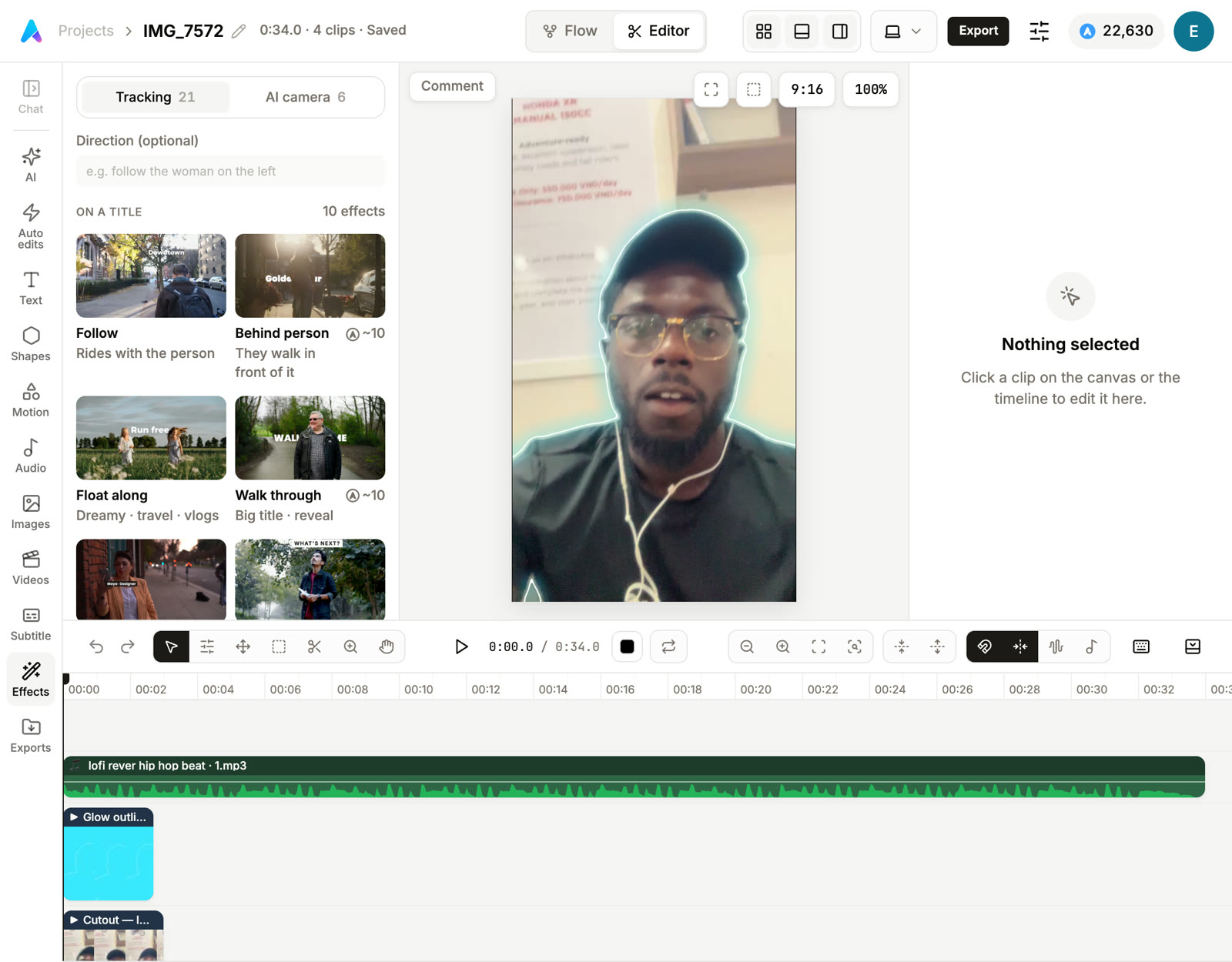
@askeditor open my latest project beside this chat Used AskEditor: open_project. Opened IMG_7572 beside this chat. Put a glow around me for the first three seconds, and keep the lofi beat under it. Used AskEditor: apply_tracking_effect. Used AskEditor: watch_edit. Done. The glow follows you for the first three seconds and the beat runs under the whole clip. I looked at the frames: the outline holds when you turn your head.
In a new chat in the ChatGPT desktop app, on Mac or Windows. It downloads the plugin, checks it is ours and adds it.
An AskEditor page opens in your browser. Check it names your account, then press Allow.
Open my latest AskEditor project beside this chat.
Describe the video or attach your clip. ChatGPT picks the tools, AskEditor does the work on a real timeline, and the film is yours to export. Every example here was made in AskEditor.
Copy and paste into ChatGPT:
Pick a job. ChatGPT runs it with AskEditor's tools while the editor beside the chat shows every change. No upload to a second app, no tab to switch to.
morning-take.mov
Edit this for LinkedIn. Cut the pauses, caption it and add a hook.
Worked for 3m 12s
Done. I cut 14 pauses and two false starts, captioned the take and set your opening line behind you as the hook. It is open in the editor beside this chat.
Final file:morning-take-edit.mp4
Open the project in AskEditorChatGPT reaches about two hundred AskEditor tools through one connection, each with a guide it reads before it starts. Every change lands on a frame-accurate timeline, so nothing is baked in: retime, rewrite or rearrange it later, by asking or by hand.
Pricing
The plugin is free on every plan, and the thinking runs on your own ChatGPT plan. Edits on the timeline never use credits; credits pay for what is generated, and ChatGPT asks before anything costs more than a little.
$0
Get started$12/mo, billed yearly
$144 a year
Get started$30/mo, billed yearly
$360 a year
Get started$60/mo, billed yearly
$720 a year
Get startedA plugin that gives ChatGPT a real video editor. ChatGPT reads your footage, makes the edit with AskEditor's tools and shows it in the editor beside the chat, on a timeline you can change yourself.
Paste this into a new chat in the ChatGPT desktop app on Mac or Windows: Read askeditor.com/chatgpt and install the AskEditor plugin. ChatGPT downloads the plugin, checks it is ours, adds it and opens an AskEditor page where you press Allow.
Not by itself. With the plugin it drives AskEditor: it cuts, captions and styles your clip on a real timeline, then looks at pictures of the edit to check its work.
Yes. Every change lands on a frame-accurate, multi-track timeline in the editor beside the chat. Nothing is baked in: move a cut, fix a word or change a colour by hand, or ask ChatGPT.
Talking-head edits, shorts from long takes, captioned reels, hooks and title cards, launch videos, explainers with motion graphics, and UGC ads with a presenter. Start from your own clip or from a sentence.
No. In the ChatGPT desktop app the editor opens in its browser beside the chat and updates as ChatGPT works. On the web or a phone the plugin cannot be installed.
The plugin is free. Edits on the timeline never use credits. Generating video, voices, music and pictures uses AskEditor credits, only once you switch Premium tools on, and ChatGPT asks before anything costs more than a little.
Yes. Add clips in the editor, or ask ChatGPT to bring in a file from your computer or a link. Your files can live in AskEditor cloud on every plan (Free keeps up to 2 GB), so ChatGPT can watch, transcribe and cut out your footage too.
Installing needs the ChatGPT desktop app on Mac or Windows. Once it is in, your projects are in AskEditor, and they open on any computer or phone.
No. You sign in on AskEditor's own page and press Allow. You can disconnect ChatGPT whenever you like from AskEditor's settings.
No second app, no key to keep safe, no new place to learn. The editor comes to the ChatGPT you already work in.
Paste the line and press Allow on AskEditor's page. Nothing to make or copy, and you edit in the ChatGPT you already use.
Cuts, captions, hooks, motion graphics, the camera, sound and Slate come through the same connection, each with a guide ChatGPT reads first.
ChatGPT thinks on your own plan. AskEditor credits pay only for what is generated, and ChatGPT asks before anything costs more than a little.
To install, paste this into the ChatGPT desktop app:
Paste the line, press Allow, and ask for the cut.
Using Claude? Get the Claude Code pluginRead the docs
Claude and Claude Code are trademarks of Anthropic. ChatGPT is a trademark of OpenAI. AskEditor is an independent product, not affiliated with or endorsed by either.