

How to Compare AI Avatars for UGC Video Ads (2026 Guide)
Compare AI avatars for UGC video ads across 7 platforms, scored on a 5-factor rubric built for 2026 ad buyers.
Running paid UGC ads in 2026 means shipping ten variations a week to stay competitive. The creators marketing teams used to hire charge $150 to $2,000 per video and take a week to deliver. AI UGC avatar tools now produce comparable output for $2 to $20 per video in minutes.
That cost delta is the reason every performance marketer is evaluating them. The market filled up fast, though, and the platforms that market themselves the hardest are not always the ones that fit a serious ad workflow. Pick the wrong tool for your use case and you burn a month before noticing, along with the budget you spent testing on a platform that was never going to deliver what you needed.
This post is the shortcut. We compare AI avatars for UGC video ads across seven platforms against a five-factor rubric, so you can pick the right one on first read.
Key Takeaways
- When you compare AI avatars for UGC video ads, the decisive factors are character consistency, editor depth, and cost per ad, not the number of stock avatars or the language count a platform advertises.
- Most platforms give you a generated video and nothing else. The tools that let you edit every shot after generation are the ones that survive a serious performance-marketing workflow.
- Your bottleneck decides the pick: AskEditor wins where character consistency and post-production editing matter, while Arcads wins where pure short-spot realism is the deciding factor.
Why Marketers Need AI UGC Avatar Tools Right Now
The pitch for AI UGC avatars is usually framed as a cost story. It is a cost story. A human creator quotes $500 for one ad. AI tools charge about $5 for a comparable render. Testing 50 variations drops from $25,000 and a full month to roughly $250 and two hours.
But the real reason the category matters is velocity. Performance teams used to ship two UGC variations a week. With AI tools they ship twenty. That volume makes proper A/B structure possible at the hook and voice-over level, which is where the creative wins get decided.
One more thing, because it is the question every buyer eventually asks. Does the output look AI or does it look like a real creator? In 2026 the gap has closed but it is not closed. A viewer who clocks the ad as AI within the first two seconds is a lost impression, and tools vary a lot on the three signals that drive that call: lip-sync cleanliness, voice naturalism, and facial emotional range. A polished avatar with a flat voice reads as corporate. A decent avatar with clean lip-sync and natural pacing reads as UGC. That variance is why the rubric below matters more than any single "best" pick.
The catch: every platform in this space optimizes for a different step. Some optimize for raw avatar realism. Some optimize for language coverage. A few optimize for the editing work that happens after generation, which is where the last 20 percent of ad quality gets built. The tool you pick should match whichever step is currently your biggest blocker.
The 5-Factor Rubric for Comparing AI Avatars for UGC Video Ads
The SERP for this topic is full of listicles that pick tool favorites without explaining the criteria. That is the main reason buyers end up on the wrong platform. Before ranking anything, here is the rubric we use.
1. Character consistency and reusability. Can you build one spokesperson and re-use them across every ad in a campaign, or does each new ad start from a fresh stock actor? A stock-actor library of 1,000 avatars sounds impressive until you realize your brand needs the same face for twenty ads, not twenty different faces for one ad. The deeper version of this factor is customization and ownership: can you upload a photo of your founder, generate a character from a text description, lock a 7-view reference sheet, and own that identity so no other brand on the platform can use it? That is the difference between a stock actor and a spokesperson.
2. Editor depth. After the avatar talks, can you actually edit the output? Trim a beat, redo a take, split a scene, swap a hook without re-rendering the whole video. Most AI UGC tools return a finished clip and nothing else. A real editor with a timeline decides whether you are working with the platform or fighting it.
3. Voice quality, lip-sync, and voice cloning. Lip-sync cleanliness and voice naturalism are what buyers compare on, not language count. A viewer who clocks the ad as AI within the first two seconds is a lost impression, and lip-sync drift is usually the first tell. The next tell is voice pacing: does the generated voice sound like someone talking to camera or like an automated reader? The third check is whether you can train your own voice from a short reference sample, so the character speaks with a branded tone instead of a stock voice. Language count matters too, but only for global campaigns. For most buyers in 2026, the first three questions decide the pick.
4. Cost per ad and throughput. Two numbers decide whether a plan survives a real A/B cycle: cost per rendered ad, and variations per hour. Buyers on PPC forums quote the same math: testing 50 ad variants costs under $200 on AI tools versus $7,500 to $10,600 with human creators. A $29 monthly plan that caps at four renders hits the ceiling the first week. A credit-based plan in the $0.30 to $1 per-ad range scales with your test budget. Price transparency still matters, it just sits under this. If a platform hides pricing until after signup, you cannot run the scaling math in advance.
5. Commercial rights on export. Do you own the output after you cancel? Some platforms strip rights when the subscription lapses. Worth checking the fine print before you ship a six-figure ad campaign built on assets you do not actually own.
AI UGC Avatar Tools at a Glance
| Tool | Speed per ad | Voice cloning | Shot-by-shot editor | Best for |
|---|---|---|---|---|
| AskEditor | ~4 min | Yes, 15-sec sample | Yes | Branded character consistency + shot-by-shot editing |
| Arcads | 5-8 min | No (stock voices only) | No | Short-spot realism |
| HeyGen | 3-5 min | Yes | No | Presenter-style localization |
| MakeUGC | ~30 min on long scripts | Yes | No | Affordable entry point |
| Creatify | Fast in batch | No (stock voices) | Limited | URL-to-video bulk generation |
| Synthesia | 3-5 min | Yes | No | Corporate training (not UGC) |
| Colossyan | 3-5 min | Yes | No | Talking-head testimonials |
Full honest breakdown for each tool below.
Common Failure Modes in AI UGC Avatar Tools
Across the seven tools, the same five failure modes show up in reviews and PPC-forum threads. If a tool you are evaluating falls into one, it does not disqualify the tool, but it does tell you where to A/B test before committing the media budget.
- Lip-sync drifts on scripts over 20 seconds. MakeUGC and Colossyan are flagged most often in user reviews. Workaround: keep ad copy under 20 seconds or pick a platform that supports per-scene re-render.
- Voice reads flat outside English. Tools without voice-cloning support fall back to stock voices that sound off in non-English languages. Arcads is limited here because it does not currently support voice cloning on its stock-actor pool.
- Emotional range collapses in close-ups. Synthesia and HeyGen get presenter-style delivery right but freeze up on selfie-style emotion. If your ad is a reaction, an unboxing, or anything hook-driven, test before you scale.
- Output quality varies render to render. Several tools return a great ad on one generation and a broken one on the next (lip-sync off, voice clipping, eye-drift). Tools with shot-by-shot editing are the only real hedge: you regenerate just the broken scene, not the whole video.
- Editor lag. When a tool does have an editor surface, timeline freezes are a common Reddit complaint. Worth checking how the editor holds up on a 45-second ad with three scenes before you commit a month of production to it.
The Best AI UGC Avatar Tools for 2026, Ranked
1. AskEditor. Best for Branded Characters and Shot-by-Shot Editing
AskEditor is an AI video studio that ships with a fully professional video editor behind the avatar generator. Upload a photo of your founder, generate a custom character from a text description, or pick one from the library, and the Studio locks a 7-view reference sheet so the character stays identical across every ad, every product scene, every language you ship. That character is yours alone, not a stock actor other brands on the platform can also use. Drop them into any script and the Studio renders a lip-synced ad using production-grade video models like Kling V3 and Seedance. Then you drop into the canvas editor and refine every shot with a real timeline, layers, transitions, and effects, exactly like you would in a pro post-production app.
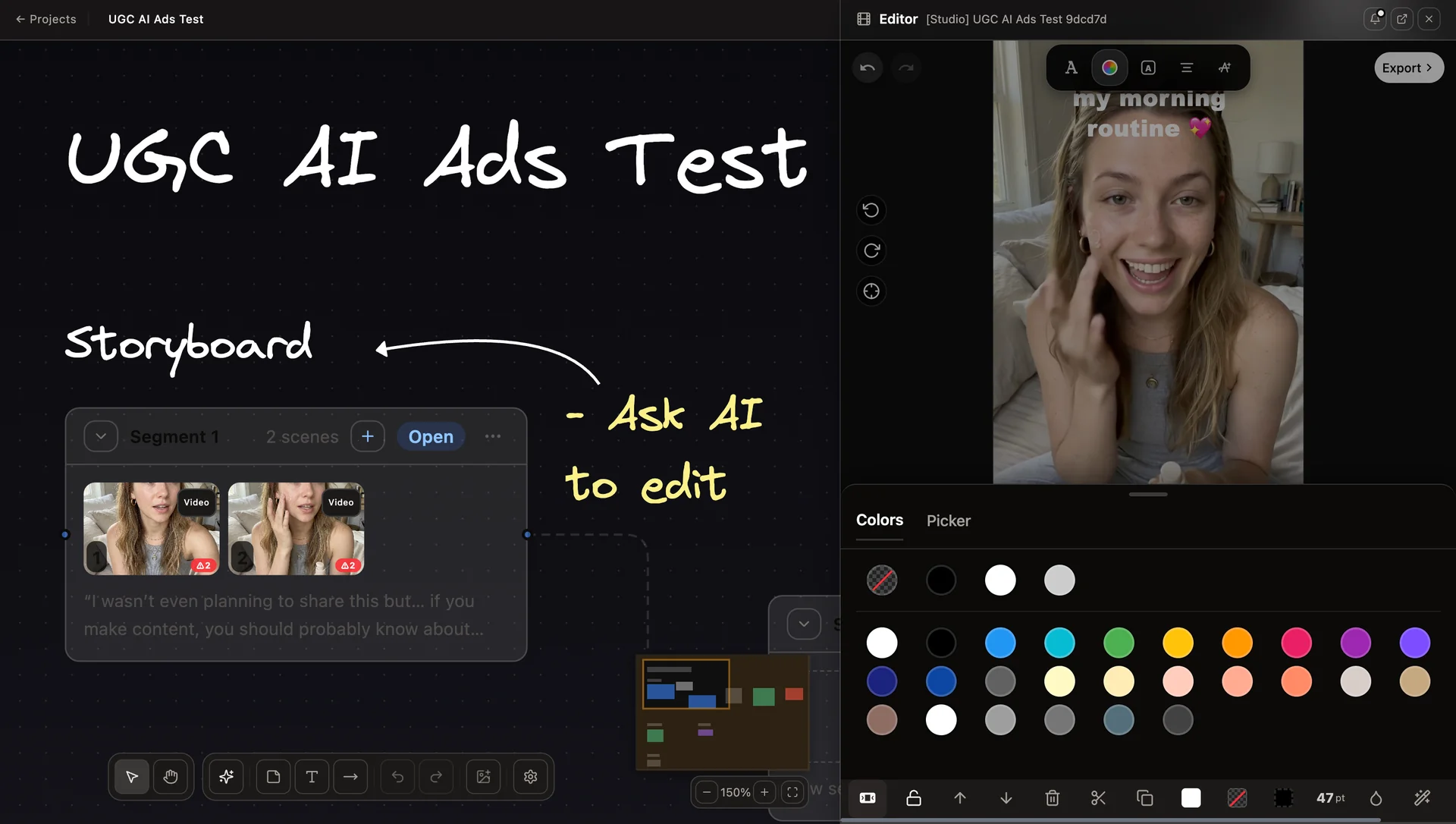
Most AI UGC tools stop at step one. AskEditor is the only tool in this list that gives you step two.
Key features for UGC ad teams:
- Character Library: upload a founder photo or generate from a text description, lock a 7-view reference sheet, re-use the character across every ad in every campaign, and know it stays yours (no other brand on the platform can use it)
- Voice cloning across 200+ languages from a 15-second reference sample
- Shot-by-shot timeline editor with per-scene regeneration
- Lip-synced image-to-video rendered through Kling V3 and Seedance
Best for: Performance marketers and agencies running more than ten UGC variations a month. Teams that need a specific brand face re-used across Q1, Q2, and Q3 creative.
Price point: Credit-based with a free tier. One UGC ad renders for roughly 20 credits. In our own 2026 testing across coffee subscription, B2B SaaS, and skincare UGC scripts, a 15-second lip-synced spot lands in about four minutes including voice generation and export, and the same branded character renders identically across every scene change.
2. Arcads. Best for Realism in Short-Form Spots
Arcads ships more than 200 stock digital actors with very strong facial micro-expressions. For sub-60-second TikTok and Meta spots, the realism is genuinely the best in this field. Independent testing we reviewed suggested Arcads output can be hard to tell apart from human UGC in short formats.
Honest win: facial emotion detail and hand-gesture naturalism on short spots.
Honest losses: no timeline editor, roughly 30 supported languages, and pricing starts at around $110 per month with no free trial. The closed pricing means scaling calculations happen after signup, not before.
Best for: Brands running Meta and TikTok spots under 45 seconds where the micro-expression polish moves click-through rate.
3. HeyGen. Best for Presenter-Style Localization
HeyGen publishes more than 1,100 AI avatars and supports 175 languages with natural-sounding voices. It is stronger as a presenter tool than a UGC tool. The output has a polished feel that reads as "corporate explainer", which works for SaaS walkthroughs and underperforms as native-feeling social UGC.
Honest win: language coverage and avatar library depth.
Honest loss: the polish reads as staged in ad contexts where audiences expect selfie-style authenticity. HeyGen is a strong tool if your UGC is actually presenter content labeled as UGC.
Best for: Multilingual SaaS explainers and testimonial-style content where a polished delivery is the goal.
4. MakeUGC. Best Affordable Entry Point
MakeUGC starts at $29 per month and focuses on a tight workflow: pick a template, write a script, generate the ad. The avatar quality is competent, not class-leading. Lip-sync occasionally drifts on longer scripts, but for teams testing the AI UGC category for the first time the price point makes the risk low.
Honest win: genuinely cheap entry pricing and a simple workflow.
Honest loss: lip-sync drift on anything over 20 seconds, limited per-scene editing, and no persistent-character layer.
Best for: Brands running their first five AI UGC ads before committing to a pricier platform.
5. Creatify. Best for URL-to-Video Bulk Generation
Creatify's pitch is paste-a-product-URL, get-a-video. The platform scrapes the product page, writes a script, and renders an ad using one of around 900 avatars. Ecommerce teams running tests at SKU scale use it to batch five or ten variants per product in a single afternoon.
Honest win: the URL ingestion does save twenty minutes of scripting per SKU.
Honest loss: per-scene editing is minimal, so the output starts to feel formulaic after fifteen ads.
Best for: Shopify stores with a wide SKU catalog that need to hit ten ad variations per product for paid testing.
6. Synthesia. Best for Enterprise Training, Not UGC
Synthesia supports 140 languages and ships 160 polished stock avatars. The quality is high. It is also the wrong tool for UGC. The studio feel of the output reads as training video, which is exactly what the platform was designed for. Strong pick if you are actually producing internal training content and not paid UGC ads.
Honest win: avatar polish and multilingual coverage for corporate contexts.
Honest loss: zero fit for selfie-style UGC formats. Ads built in Synthesia feel like presentations.
Best for: Enterprise training, onboarding videos, and internal comms in multiple languages.
7. Colossyan. Best for Talking-Head Testimonials
Colossyan sits between HeyGen and Synthesia in positioning. Strong text-to-speech quality, clean avatar delivery, and a generous free tier for testing. The output lives in the testimonial zone, a person talking directly to the camera in a clean environment, with no dynamic scene changes or product-in-hand sequences.
Honest win: talking-head testimonials and training content at an accessible price.
Honest loss: not built for ad-native formats like unboxing, product demos, or hook-driven short spots.
Best for: SaaS customer-testimonial videos and mid-funnel content.
How to Choose the Right AI UGC Avatar Tool
Start with your bottleneck, not your budget.
If your biggest blocker is brand consistency across a campaign, pick a tool with a real persistent-character layer. AskEditor is the strongest fit here because the Character Library ties one spokesperson to a 7-view reference sheet that survives every shot. Arcads, Creatify, and HeyGen all ship stock-actor libraries that work against brand consistency by design.
If your biggest blocker is hook iteration velocity on Meta or TikTok, pick Arcads for realism or MakeUGC for cost. Both work well for the thirty-hooks-in-a-week testing cadence. Neither will carry you past the point where you need post-production editing.
If your biggest blocker is language coverage for LATAM or APAC expansion, AskEditor's 200+ language voice cloning outcovers everything else. HeyGen at 175 languages is a distant second. Synthesia at 140 is enterprise-training, not UGC.
If your biggest blocker is post-production polish (split a scene, redo a take, adjust timing), AskEditor is currently the only platform in this list that gives you a shot-by-shot editor. Every other tool returns a finished video you either accept or re-render from scratch.
If your biggest blocker is budget, start with MakeUGC at $29 a month and move to AskEditor or Arcads once the category pays back the first campaign.
One more filter: before you pick any of these, check the commercial-rights clause. Several of the seven strip export rights under specific cancellation conditions. Worth ten minutes of reading before you ship a paid campaign.
The Bottom Line
If you want to compare AI avatars for UGC video ads and arrive at a single answer, you cannot. The category is too use-case-dependent. What you can do is apply a consistent rubric and pick the one tool that matches your bottleneck today, then re-evaluate after thirty days of real ad spend.
For teams running real performance campaigns with character consistency and post-production requirements, AskEditor is the most complete single platform in this list. For pure short-form realism, Arcads. For presenter localization, HeyGen.
AskEditor also handles full script-to-video stories and longer-form content beyond UGC, so the same workflow scales when your campaigns widen to brand videos, explainers, or multi-scene storytelling.
See how AskEditor scores on your own rubric, then create your first UGC ad free.